nice-shot
NiceShot!
An interactive dashboard for exploring tokamak plasma shot data. Point it at a shot-statistics file and get an instant browser UI for slicing, visualising, and comparing shots.
Features
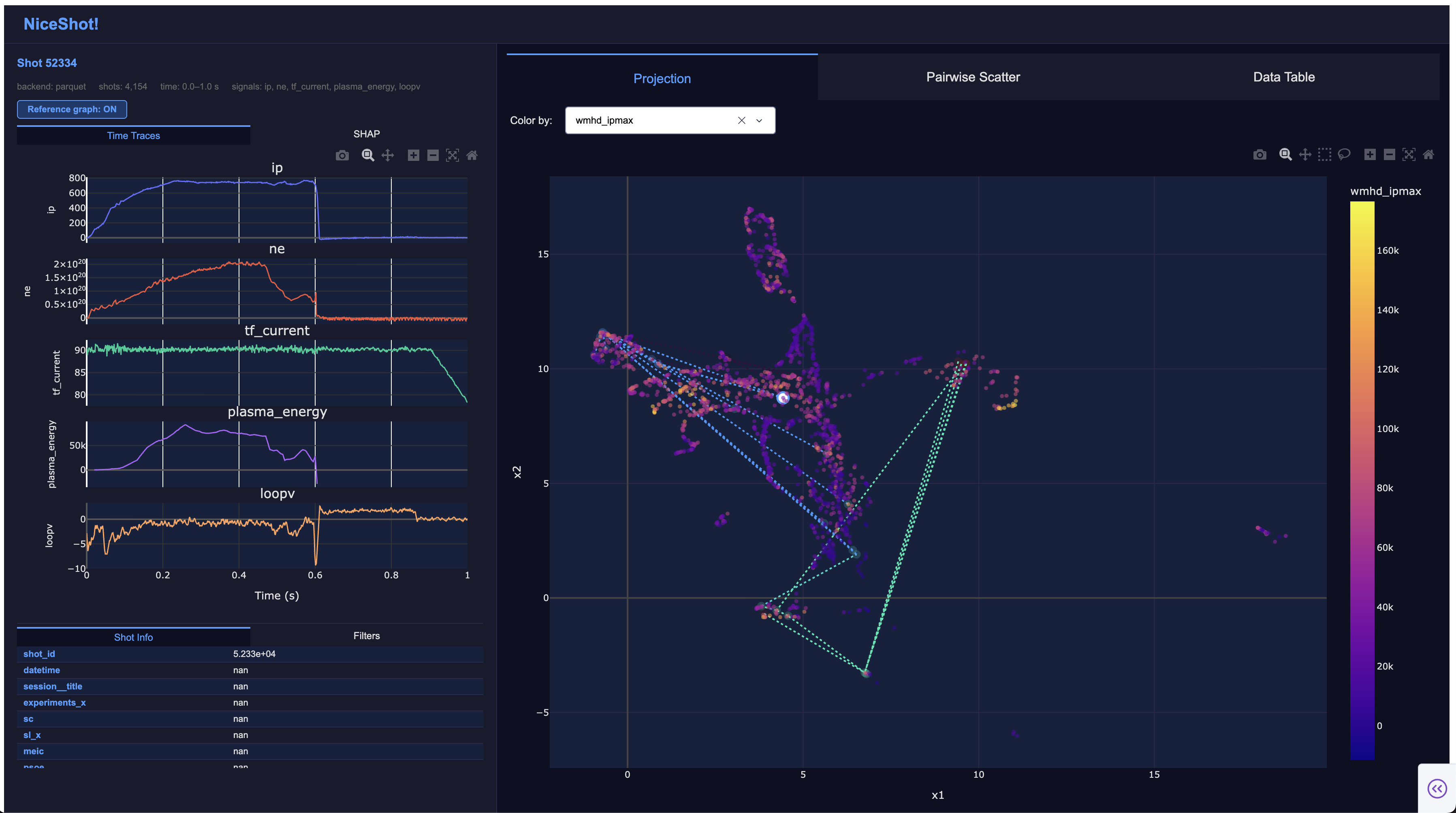
- Projection — UMAP or PCA scatter of every shot, coloured by any column. Backed by a content-hash cache so reloads are instant.
- Pairwise scatter — any two numeric columns plotted against each other, with linear/log axis toggles.
- Correlation — interactive Pearson correlation heatmap for any selection of numeric columns.
- Data table — sortable, virtualized table with shot-ID search, cross-highlight with scatter plots, and CSV export.
- Time traces — per-shot signal plots loaded on click. Supports local parquet/CSV files, live UDA, live SAL, and FAIR MAST (Zarr/netCDF, local or remote) backends.
- Filters — up to 6 simultaneous column filters combinable with AND / OR logic. All plots update live.
- Clustering — run K-Means, DBSCAN, or Agglomerative clustering on any set of numeric columns. Results colour the scatter plots immediately; clusters can be given human-readable class names.
- Cluster centroid traces — mean time-series per cluster, computed automatically after clustering and relabelled live as class names change.
- Outlier detection — flag anomalous shots with Isolation Forest or Local Outlier Factor. Outliers are highlighted in red on the scatter plots and sample traces are loaded automatically.
- CSV export — download the full data table with
cluster_id,cluster_namecolumns appended when clustering has been run. - SHAP decision plots — per-shot feature attribution rendered inline (optional, requires
--shap-data). - Reference graph — overlay the full reference-shot lineage on any scatter plot (optional, requires
reference_shot_colin config). - Semantic search — find shots similar to a selected one via nearest-neighbour search in feature space. Results are highlighted on the scatter plots with gold ring markers.
- Long-format files — point NiceShot at a table with one row per (shot, variable) and pick the variable from a header dropdown. Only the selected variable’s rows are read, and the projection is computed for that variable alone.
- Extensible backends — add support for new data sources (MDSplus, HDF5, custom APIs, …) by subclassing
TraceBackendorShotDataBackendand registering viaplugins:in config.
Requirements
Python ≥ 3.12
Install
pip install nice-shot
pip install "nice-shot[shap]"       # + SHAP plots, xarray, matplotlib
Run
nice-shot path/to/shot_stats.parquet
SHOT_DATA is the only required argument — everything else has a default. Open http://localhost:8050 in a browser.
By default nice-shot runs under gunicorn with 4 worker processes, which supports multiple concurrent users. On first run, UMAP/PCA is computed in the master process and cached; subsequent starts are instant.
For local development with hot-reload use --debug:
nice-shot path/to/shot_stats.parquet --debug
Common flags
| Flag | Default | Description |
|---|---|---|
SHOT_DATA |
— (required) | Shot statistics file (.csv or .parquet) |
--config PATH |
nice_shot/config.yaml |
YAML config file |
--data-dir PATH |
data/mastu/ |
Directory of per-shot files (parquet backend) |
--projection PATH |
— | Pre-computed 2-D embedding; skips UMAP/PCA entirely |
--shap-data PATH |
— | SHAP values NetCDF (.nc); enables the SHAP tab |
--workers N |
4 |
Gunicorn worker processes (ignored in --debug mode) |
--port PORT |
8050 |
Port to listen on |
--debug |
off | Use the single-process Flask dev server instead of gunicorn |
Config-backed flags
Every option in nice_shot/config.yaml also has a CLI flag of the same name. An explicit CLI flag overrides the config file, which overrides the built-in default:
| Flag | Config field |
|---|---|
--backend NAME |
backend |
--signals SIGNAL [SIGNAL ...] |
signals |
--min-time SECONDS |
time_window.min_time |
--max-time SECONDS |
time_window.max_time |
--timebase-hz HZ |
uda.timebase_hz |
--projection-method {umap,pca} |
projection_method |
--variable-column NAME |
variable_column |
--umap-features COLUMN [COLUMN ...] |
umap_features |
--umap-exclude-features COLUMN [COLUMN ...] |
umap_exclude_features |
--reference-shot-col NAME |
reference_shot_col |
--plugins MODULE [MODULE ...] |
plugins |
--backend-option KEY=VALUE (repeatable) |
backend_options (merged per-key) |
Run nice-shot --help for full descriptions.
Configuration
Edit nice_shot/config.yaml (or pass --config to point elsewhere):
backend: parquet        # parquet | uda | sal

signals:                # columns shown in the time-trace panel
  - ip
  - ne
  - dalpha

time_window:
  min_time: 0.0
  max_time: 1.0

projection_method: umap # umap | pca

umap_features:          # omit to use all numeric columns
  - ip_max
  - ne_max
  - bt_max

reference_shot_col: reference__number   # omit to hide the feature
Any of these can be overridden for a single run with the matching CLI flag — see Config-backed flags above.
Data
Shot statistics file (SHOT_DATA) — a flat .parquet or .csv with one row per shot. The shot ID column is detected automatically (shot_id, shot, pulse, number, …).
Per-shot traces (--data-dir) — one .parquet or .csv per shot, laid out as:
<data-dir>/<any-subdir>/<shot_id>.parquet
Each file needs a time column and one column per configured signal.
Pre-computed projection (--projection) — a .npy (shape (n,2) or (n,3)), .csv, or .parquet with shot ID and two coordinate columns.
SHAP values (--shap-data) — an xarray NetCDF file with shot_id and feature dimensions.
See docs/data-formats.md for full schema details.
Docs
uv run --dev zensical serve
Opens the full documentation at http://localhost:8000.